

6 MIN READ
The DevSecOps pipeline in 2026 is, in the end, mostly a sequence of security gates inserted at the right stages of the software delivery lifecycle, with the right scope at each gate, and with the cost of the gate low enough that the engineering org will actually run the gate on every commit. The pipeline has been promised for a decade, sold in a hundred vendor pitches, and most often implemented as a wall of slow tools that the engineering org has learned to bypass. The right answer is shorter, cheaper, and more disciplined than the vendor pitch. This is the field guide.
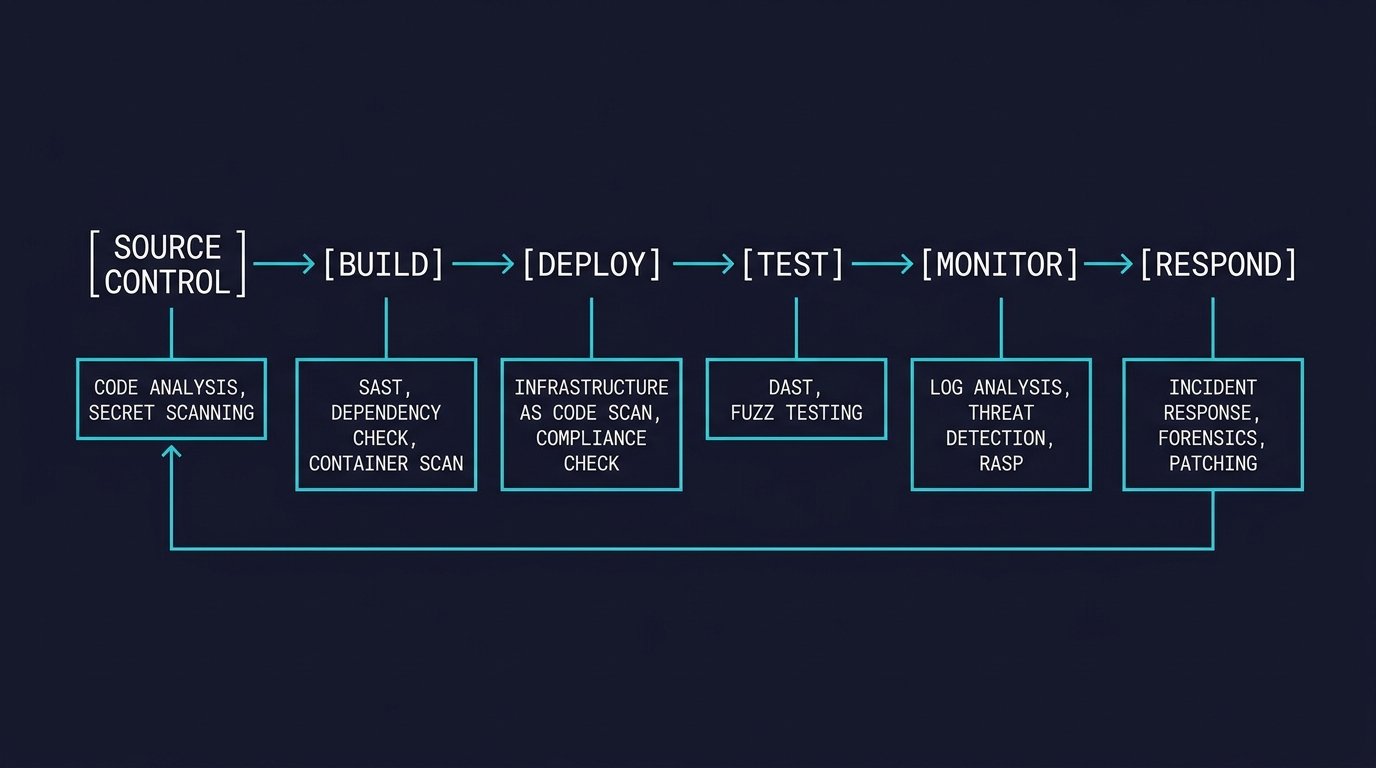
The gates, in the order they should fire
Six gates earn their place on a modern pipeline. The secret scanner goes first because it is the fastest, it catches the highest severity class of bug, the credential in the code, and it fails the build before any other work is done. Tools like Gitleaks, TruffleHog, and detect-secrets run in seconds on a typical repo and produce output that any reviewer can act on. The dependency scanner goes second, and the CISA KEV list should be the input, because the goal is to fail the build on the known exploited vulnerabilities and warn on the rest. Failing every CVE pushes the engineering org to bypass the scanner, and most engineering orgs have done this at some point. Static analysis goes third, configured to fail on the high severity findings, warn on the medium, and ignore the low. A static analyser that fails the build on every finding will be bypassed, and the bypass will silently disable the protection. The container scanner, the integration test, and the deploy time policy check round out the six. Total runtime for the whole sequence should sit under ten minutes on a typical change, and the engineering lead should know exactly which minute is being spent on which gate.
What the gates should not do
Three failure modes show up over and over, and all three are configuration choices. Long running full scans are at the top of the list. A scan that takes thirty minutes becomes the scan the engineering org has to wait for, which becomes the scan the working developers work around by running it in a way the result can be ignored. The target is five minutes or less, run in the background of the developer editor, with the result delivered before the engineer moves on to the next task. The high false positive rate is the next failure mode. A pipeline that produces a hundred findings per build becomes one the engineering org has stopped trusting, and an engineering org that has stopped trusting the findings stops reading them. The target is zero to three findings per build, and the findings should be the ones the ICs have agreed matter. Blocking the deploy on the medium severity rounds out the list. Medium severity is real but not always exploitable, and the right place for medium is a ticket in the backlog, not a hard block on the production push. The pipeline that blocks on medium has been configured to look thorough, and the ICs have learned to bypass it. None of the three failure modes are bugs in the tools. All three are choices the security org made on behalf of an engineering org that did not push back.
What the gate that does not run looks like
The gate that does not run costs more than any gate that does. The reason the engineering org has turned it off is usually one of three things: the gate is too slow, the gate has too many false positives, or the gate is blocking on a severity the working developers do not have the authority to fix. The pipeline with the gates turned off looks secure in the security dashboard, while the pipeline that looks secure in the dashboard is the one that is not actually secure. The honest answer is to measure gate uptime, measure gate bypass rate, and surface the bypass to the security org. The security org should know which gates are being bypassed, how often, and why. The gate being bypassed for a legitimate reason needs to be fixed by the security org. The gate being bypassed for an illegitimate reason needs to be enforced. Both categories exist in every pipeline that has been running longer than six months, and most security orgs are only tracking the legitimate-bypass side of it.
What good looks like
A good DevSecOps pipeline has three properties, and the order matters. Fast gates that produce accurate findings, run on every commit. Gates owned by the engineering org, with the authority to tune the gates to fit the workflow. Gates that are measured and reported on as part of the engineering metrics rather than the security metrics. A good pipeline is also boring. The gates fire, the gates produce zero to three findings, the findings are the ones the people writing the code have agreed to, and the engineering org trusts the gates. The pipeline is not the place for the experimental tool, the pipeline is not the place for the vendor demo, and the pipeline is not the place for the security org to add the seven new tools the security org read about at the conference. The pipeline is the place for the boring, the reliable, and the trusted. The pipeline that is not used does not catch the bugs, and the pipeline that does not catch the bugs has been configured to look secure rather than to be secure.
The bottom line
The DevSecOps pipeline in 2026 is six gates in a specific order, owned by the engineering org, measured on gate uptime and bypass rate. The security org that treats the pipeline as a product the ICs consume will get adoption. The security org that treats the pipeline as a control the ICs tolerate will get bypass, and the dashboard will not show it.
Sources & Further Reading
All claims in this article are sourced from primary documentation, vendor advisories, and reputable security researchers.
Spotted an error? Email the editor. Corrections are issued with a visible correction note.
Editorial standards. Every article on humanrequired.org is reviewed by a human editor before publication. AI may assist with drafting or research; final editorial control is human. Read the full standards.


